Text message consent
Last updated: October 31, 2026
Peak Affinity runs membership storefronts and kids club portals for sports teams. Members can choose to sign in with a one-time code sent by text message. We send no marketing or promotional texts.
How members opt in
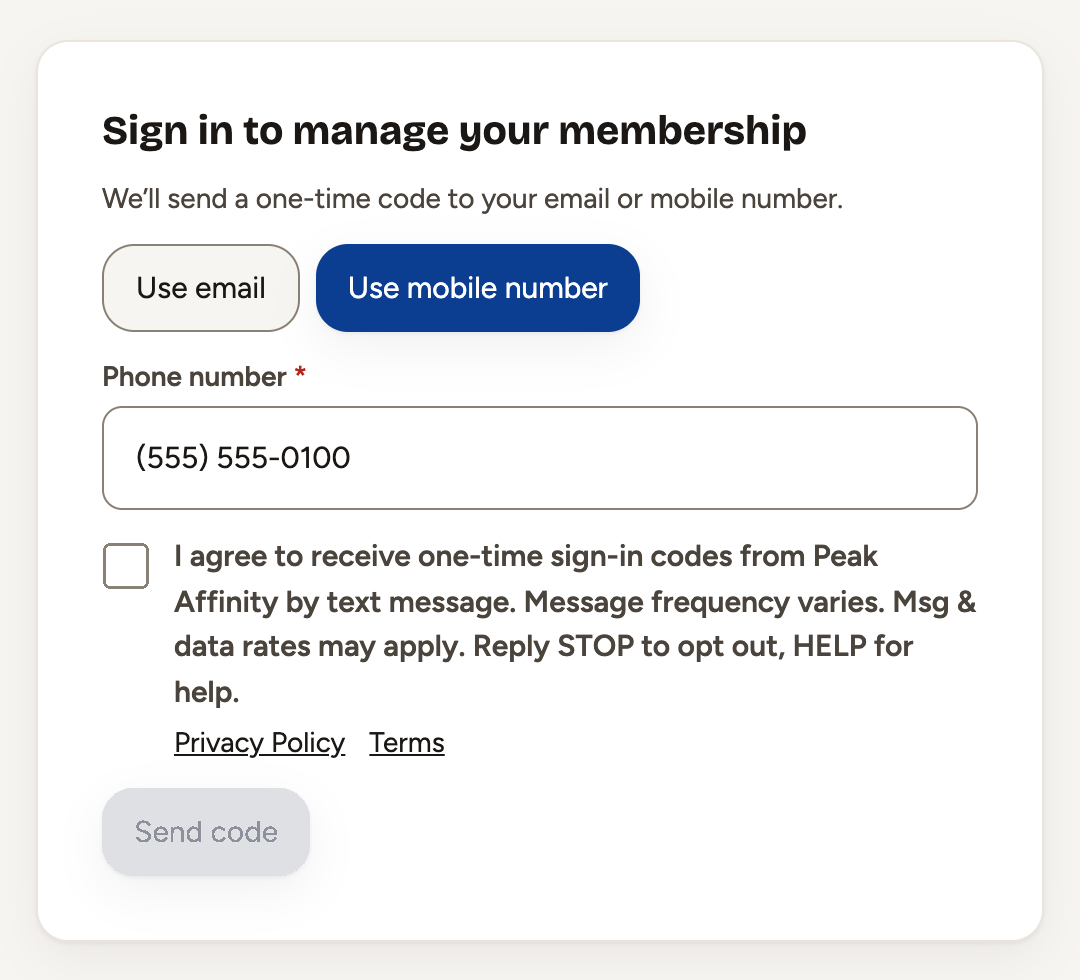
- On the sign-in screen, the member chooses to get a code by text and types their own mobile number.
- Next to the phone field is a checkbox, unchecked by default, that reads: “I agree to receive one-time sign-in codes from Peak Affinity by text message. Message frequency varies. Msg & data rates may apply. Reply STOP to opt out, HELP for help.” It links to our Privacy Policy and Terms.
- The Send code button stays disabled until the member checks the box. Our servers also refuse any text request that does not carry this consent.
- We send one code per request, only when the member asks for one.
The sign-in screen
Sample message
482913 is your Caps Kids Club sign-in code. It expires in 10 minutes. Reply STOP to opt out.

@capskidsclub.com #482913
The message names the member's club, and its last line lets the phone fill in the code on that club's site. Staff at member organizations can sign in to the Peak admin the same way, with the same consent checkbox.
Opting out and help
Reply STOP to stop all texts and HELP for help. You can also email [email protected]. Mobile numbers and text consent are never shared with third parties for marketing.